

Every mid-market business handles hundreds of documents each week. Invoices, contracts, resumes, lease agreements, and compliance forms. Processing them manually means hours of data entry, frequent errors, and operational bottlenecks that slow down revenue cycles. Mid-size companies spend an average of 15 to 20 hours per week on manual document data entry alone. That time adds up to real cost and lost opportunity.
Automated document processing changes this equation. By combining optical character recognition, machine learning, and generative AI, modern systems can ingest, classify, extract, and validate data from virtually any document type at speeds that far exceed human capability. The results are measurable: operational cost reductions of 65 to 70 percent, straight-through processing rates up to 95 percent, and data extraction accuracy exceeding 99 percent according to industry research on intelligent document processing. This guide walks through what this technology does and how to implement it step by step.
What Automated Document Processing Does for Mid-Market Businesses
Automated document processing refers to technology that captures, extracts, and organizes data from documents without manual keying. Intelligent document processing (IDP) is the evolution of this concept. It uses AI to understand document context, handle unstructured formats, and adapt to new document types without explicit programming. For a mid-market business, IDP transforms stacks of paperwork into structured data that feeds directly into your CRM, ATS, or ERP.
Core Technologies: OCR, Machine Learning, and Generative AI in Everyday Terms
Three technologies power modern document processing. Optical character recognition (OCR) reads text from scanned images and PDFs. Machine learning classifies documents by type and learns to recognize patterns across thousands of examples. Generative AI adds contextual understanding, letting the system interpret handwriting, extract meaning from complex layouts, and handle exceptions that traditional rules-based systems miss. Together, these technologies form what the industry calls intelligent document processing.
How IDP Goes Beyond Traditional OCR and RPA
Traditional OCR converts images to text but cannot understand what the text means. Robotic process automation (RPA) follows fixed rules and breaks when document formats change. IDP combines both with AI to understand document structure, adapt to variations, and route data to the right systems. This matters because 85 percent of business documents are unstructured, as noted by analysts at Gartner and McKinsey. IDP is the only solution that can unlock data from those documents reliably at scale.
| Capability | Manual Processing | Traditional OCR | RPA | Intelligent Document Processing (IDP) |
|---|---|---|---|---|
| Data extraction accuracy | Varies by operator (85-90%) | 60-75% on clean scans | 90-95% on structured forms | 99%+ with AI validation |
| Handles unstructured documents | Yes, with effort | No | No | Yes |
| Adapts to format changes | Yes, with retraining | No | No (breaks on changes) | Yes (ML adapts) |
| Human oversight needed | Full | Heavy (error correction) | Moderate (exception handling) | Minimal (human-in-the-loop only) |
| Processing speed | Slow (pages per minute) | Moderate | Fast (structured only) | 10x faster than manual |
The Step-by-Step Document Processing Workflow That Delivers Real ROI

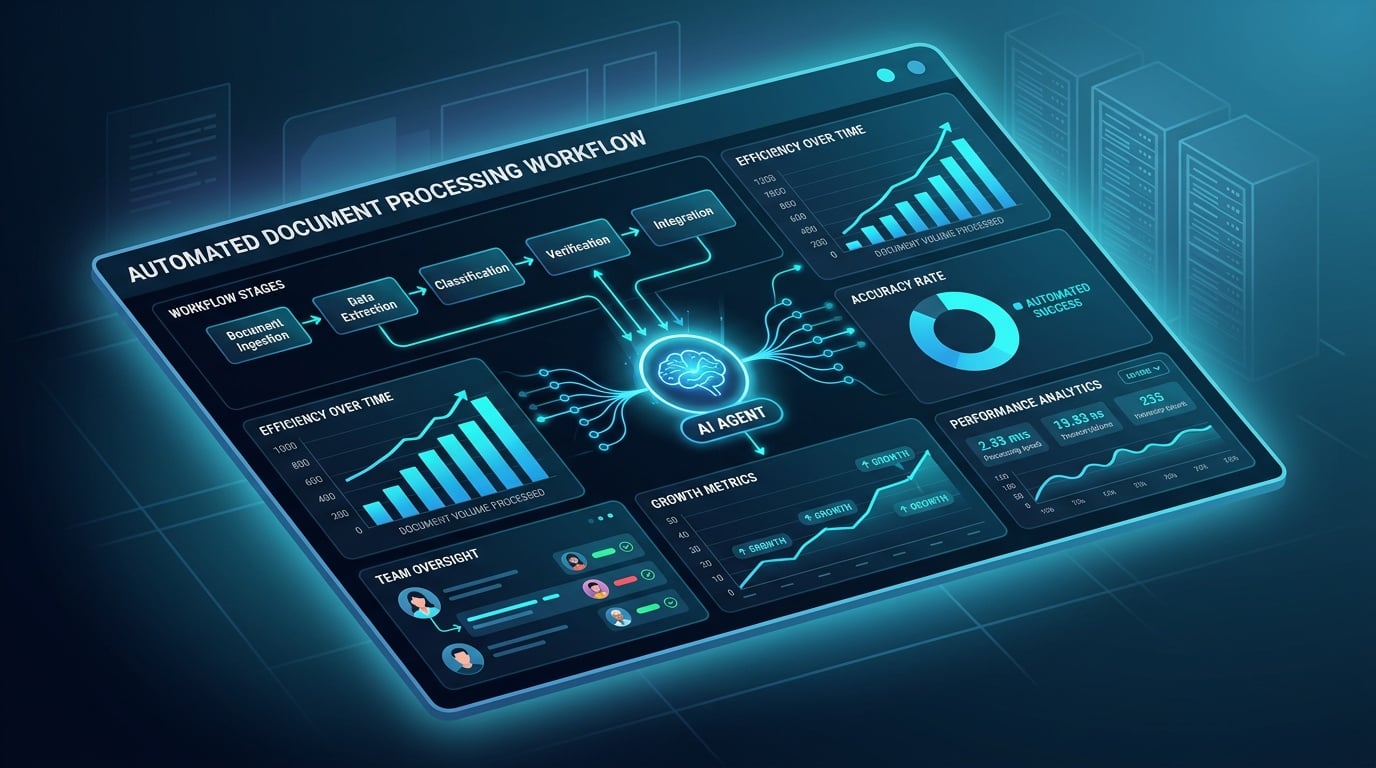
Understanding how automated document processing works in practice helps you evaluate solutions and build a business case. The workflow follows four stages, each with clear business benefits.
Document Ingestion and Preprocessing: Handling Scans, PDFs, and Images
Documents arrive as scans, PDFs, emails, or mobile photos. The system normalizes them: corrects skew, improves contrast, removes noise, and converts to a standard format. This preprocessing step directly impacts downstream accuracy. Poor image quality is the most common cause of extraction errors. A well-designed ingestion pipeline catches these issues early, reducing failed extractions and the need for human review.
Classification: Teaching AI to Identify Document Types
The AI identifies what type of document it is. An invoice, a contract, a resume, a disclosure form. Classification models trained on industry-specific data achieve this in milliseconds. Once classified, the document is routed to the appropriate extraction pipeline. For example, a real estate agency might process lease agreements, property disclosures, and closing documents through different pipelines, each tuned for the fields that matter in that document type.
Extraction and Validation: Pulling Key Fields and Catching Errors with Human-in-the-Loop Callbacks
The system extracts key fields: names, dates, amounts, clauses, and identifiers. Validation rules check for consistency and flag anomalies. This is where the human-in-the-loop callback mechanism adds value. When confidence drops below a threshold, the system automatically initiates a document processing call, requesting human verification for specific fields only. This targeted callback balances speed with accuracy without requiring full manual review. It means one person can validate exceptions across thousands of documents, not review every page.
Integration with Your CRM, ATS, or ERP
Extracted and validated data is pushed to your business systems via API. No manual export or import. Updates happen in real time. This integration is what transforms document processing from a cost center into a revenue accelerator. Recruitment agencies using document processing AI can push candidate data directly into their ATS. Real estate firms can update their CRM with tenant information the moment a lease is processed. Fundraising organizations can log donor commitments without a single keystroke.
- Ingestion and Preprocessing — Scans, PDFs, and images are normalized and cleaned for accurate extraction.
- Classification — AI identifies the document type (invoice, contract, resume) and routes it to the correct pipeline.
- Extraction and Validation — Key fields are extracted and validated. Low-confidence items trigger a human-in-the-loop callback.
- Integration — Structured data is pushed to your CRM, ATS, or ERP via real time API connections.
Organizations using this workflow see a 3x improvement in process cycle time according to Forrester research on IDP implementations.
From the field: “In our work with mid-market businesses, we consistently see document processing as the single biggest source of operational friction. Deploying an AI agent that handles the full ingestion-to-integration pipeline typically cuts processing time by 90 percent in the first quarter.” — Anas Moujahid, Operations Director, Vynta AI
One real estate agency we worked with was processing 400 lease agreements per month manually. Each lease required 45 minutes of data entry and verification. After deploying a Vynta AI document agent, they reduced processing time from 12 days to under 24 hours and eliminated data entry errors in tenant information fields. The human-in-the-loop callback caught the 3 percent of fields that needed verification, and a single administrator handled all callbacks in under one hour per month.
Vertical-Specific Use Cases: Document Automation that Works in Your Industry
Generic document processing solutions miss the mark for mid-market businesses because every industry has distinct document types, compliance requirements, and workflow patterns. An AI agent trained on real estate disclosures cannot handle recruitment resumes without retraining. This is why vertical-specific automation matters. Vynta AI builds document processing agents for the document types, regulations, and systems that matter in each sector. The result is faster processing, fewer errors, and direct integration with the tools your team already uses.
Real Estate: Automating Lease Agreements, Property Disclosures, and Closing Documents
Real estate firms process lease agreements, property disclosures, closing statements, and tenant applications. Each document contains fields that must be extracted accurately: lease terms, rent amounts, security deposits, disclosure signatures, and closing costs. Manual processing of these documents delays closings and creates liability when data is entered incorrectly. An automated document processing agent extracts these fields, validates them against property records, and pushes the data directly to your property management system or CRM. One property management firm we worked with reduced lease processing from 45 minutes per document to under 3 minutes, cutting their month-end closing cycle by 9 days. The human-in-the-loop callback mechanism caught the small percentage of fields needing verification, and a single administrator handled all callbacks in under two hours per month.
Recruitment: Bulk Resume Screening and Candidate Data Extraction from Multiple Formats
Recruitment agencies receive resumes in dozens of formats: PDF, Word, plain text, LinkedIn exports, and portfolio attachments. Each format structures candidate information differently. A document processing AI trained on recruitment data can extract candidate name, contact information, work history, education, skills, and certifications regardless of format. It classifies resumes, cover letters, and reference documents separately. The structured candidate data flows directly into your ATS, ready for matching against job requirements. Agencies using this approach process candidate intake in minutes rather than hours and eliminate the data entry backlog that slows time-to-submission. One recruitment firm processing 1,200 weekly resumes reduced their screening cycle from three days to under four hours using this approach.
Fundraising: Processing Grant Applications, Donor Letters, and Compliance Paperwork
Fundraising organizations manage grant applications, donor pledge forms, acknowledgment letters, and compliance documents. Each document type requires specific data extraction: grant amounts, restrictions, reporting deadlines for grants, pledge amounts, payment schedules, and donor preferences for contributions. Compliance paperwork demands audit trails and verifiable extraction accuracy. An intelligent document processing agent handles these document types, validates extracted data against fund records, and logs every transaction with a complete audit trail. This means development teams spend their time on donor relationships, not data entry. Organizations using this approach report processing grant applications in under 24 hours instead of the typical two week cycle.
Hospitality: Digitizing Guest Registration Forms, Invoices, and Reservation Confirmations
Hotels and hospitality groups process guest registration forms, folio invoices, group reservation confirmations, and vendor contracts. Guest data must be extracted accurately for both operational use and compliance with privacy regulations. Invoice processing requires matching charges to reservations and identifying discrepancies. A document processing agent extracts guest names, room numbers, stay dates, folio charges, and payment details. It flags anomalies like missing signatures or incomplete registration data for human review. Properties using this approach reduce front desk administrative time and accelerate the check-in and billing cycles. A mid-size hotel group we worked with cut invoice processing time by 75 percent and eliminated guest check-in delays caused by missing registration data.
Industry Document Processing at a Glance
| Industry | Document Types | Key Fields Extracted | Business Outcome |
|---|---|---|---|
| Real Estate | Lease agreements, property disclosures, closing statements, tenant applications | Lease terms, rent amounts, security deposits, signatures, closing costs | 9 day reduction in closing cycles, 90% faster lease processing |
| Recruitment | Resumes (PDF, Word, plain text), cover letters, reference documents | Name, contact info, work history, education, skills, certifications | Minutes vs hours for candidate intake, eliminated data entry backlog |
| Fundraising | Grant applications, pledge forms, donor letters, compliance documents | Grant amounts, restrictions, deadlines, pledge schedules, donor preferences | Grant processing in under 24 hours, complete audit trails |
| Hospitality | Registration forms, folio invoices, group reservations, vendor contracts | Guest names, room numbers, stay dates, folio charges, payment details | 75% faster invoice processing, eliminated check-in delays |
Measuring Success: The Cost and Productivity Gains from AI Document Agents
Implementing automated document processing is an investment, and mid-market leaders need to see clear returns. The true value lies not just in digitizing documents, but in the measurable improvements to operational efficiency and cost reduction. By focusing on key performance indicators like straight-through processing rates and reduced manual data entry, businesses can quantify the financial impact of AI-driven document automation. These gains directly influence profitability and free up valuable human capital for more strategic tasks.
Straight-Through Processing Rates: What 95% Accuracy Means in Practice
A primary metric for success in document processing is the straight-through processing (STP) rate. This signifies the percentage of documents that are processed from ingestion to completion without requiring any human intervention. With advanced intelligent document processing (IDP) systems, STP rates can reach up to 95 percent, as noted by industry research from Docsumo. This means that for every 100 documents processed, only 5 might require a human touch. This high STP rate dramatically accelerates workflows, reduces turnaround times for critical business operations like invoice payments or contract approvals, and minimizes the potential for human error to creep into your data.
Reducing Manual Data Entry Costs by 60-70% (with a Simple Savings Framework)
Manual data entry is a significant drain on resources for mid-market businesses, consuming an average of 15 to 20 hours per week per employee. Intelligent document processing can slash these costs by 60 to 70 percent. To frame this savings, consider a simple model: calculate the average hourly wage of an employee performing data entry, multiply by the hours spent weekly on manual tasks, and then apply the percentage reduction achieved through automation. For example, if an employee costs $30/hour and spends 20 hours/week on data entry, that’s $600 weekly. A 70% reduction saves $420 per employee per week. Scaling this across a team reveals substantial annual savings, allowing you to reallocate budget toward growth initiatives rather than repetitive tasks. This is the core of achieving measurable business outcomes with document processing AI.
Compliance, Audit Trails, and Security: How Automation Improves Governance
Beyond cost savings, automated document processing significantly bolsters compliance and security. Every extraction and validation step is logged, creating an immutable audit trail that tracks document handling from start to finish. This is invaluable for regulatory compliance, internal audits, and dispute resolution. AI-driven systems ensure data accuracy, exceeding 99 percent with human-in-the-loop validation, which is critical for fields like finance and legal. Furthermore, by reducing manual touches, you minimize the risk of data breaches and unauthorized access to sensitive information. This level of governance and security is often difficult and expensive to achieve with manual processes alone.
Scaling Document Processing Without Adding Headcount
As businesses grow, so does their document volume. Scaling document processing capacity traditionally meant hiring more administrative staff, a costly and time-consuming endeavor, especially for mid-market companies. AI document agents offer a solution by providing near-infinite scalability. An automated system can process thousands of documents per hour, a volume that would require a large team to match. This means your operations can expand without a proportional increase in headcount dedicated to data entry and processing. This scalability ensures that your business can adapt to market demands and seize opportunities without being held back by administrative bottlenecks, a key benefit of intelligent document processing.
Client Success Snapshot: “We saw an immediate impact on our accounts payable team. Before Vynta AI, processing invoices took 3-5 days. Now, 98% of invoices are processed within 24 hours, and we’ve reduced data entry errors by 95%. This has freed up our team to focus on vendor relations and cash flow management, directly improving our bottom line.” — A Mid-Market Real Estate Client
How to Choose Between a Pre-Built Platform and a Custom AI Agent Solution
Navigating the options for document automation can be complex. Mid-market businesses often face a choice: opt for a general, pre-built platform or invest in a more tailored, custom AI agent solution. While general platforms offer broad capabilities, they may lack the depth and specificity required for industry-unique documents and workflows. Understanding the nuances of each approach, particularly the flexibility and outcome-driven nature of AI agents, is key to selecting the solution that best aligns with your business objectives and delivers maximum ROI.
When a General Platform (Microsoft, IBM) Works. And When It Falls Short
General document processing platforms, often found within broader enterprise software suites like those from Microsoft or IBM, can be effective for straightforward, high-volume tasks involving standardized documents. If your primary need is to extract data from simple, predictable forms like basic invoices or standardized application forms where layouts rarely change, these platforms can offer a cost-effective starting point. But they often struggle with unstructured documents, complex layouts, or variations in document presentation common across industries. Their ‘one-size-fits-all’ nature means they may require significant customization or struggle to achieve the high straight-through processing rates essential for true efficiency gains, especially when dealing with the diverse document types found in sectors like real estate or recruitment.
The Advantages of a Flexible, Agent-Based Approach for Multi-Document Packets and Complex Workflows
A custom AI agent solution, like those developed by Vynta AI, offers significant advantages for mid-market SMEs dealing with complex or varied document needs. These agents are trained on specific industry data and workflows, enabling them to handle multi-document packets (e.g., an entire lease agreement package with addendums) and complex extraction requirements with high accuracy. The agent-based approach is inherently more flexible. It can adapt to subtle changes in document formats without breaking, and it excels at understanding context within documents, not just patterns. This allows for more precise data extraction and validation, leading to higher STP rates and fewer errors, particularly beneficial for specialized tasks like candidate sourcing from varied resume formats or processing complex fundraising applications.
Questions to Ask Before Investing in Document Automation (Vendor Lock-in, Scalability, Industry Fit)
When evaluating document automation solutions, ask critical questions to avoid future problems. Consider vendor lock-in: how easy is it to migrate data or change providers if needed? Scalability is paramount: can the solution grow with your business without becoming prohibitively expensive or technically complex? Industry fit is also essential; a generic platform might require extensive, ongoing customization to meet the specific demands of real estate, recruitment, fundraising, or hospitality. For example, ask about the AI’s ability to handle industry-specific jargon, compliance norms, and document variations. A solution that truly understands your vertical, like a Vynta AI agent, will offer deeper integration and faster ROI than a platform designed for broader, less specialized use cases.
Evaluating Document Automation Solutions
Pros
- Broad Applicability: General platforms can handle many common document types with basic setup.
- Potentially Lower Initial Cost: Often bundled with existing enterprise software, reducing upfront investment for basic use.
- Established Vendors: Solutions from large providers may offer extensive support networks and infrastructure.
- Faster Deployment for Simple Tasks: Can be quicker to implement for very straightforward, high-volume document types.
Cons
- Limited Handling of Unstructured Data: Struggles with complex layouts, handwriting, or varied document formats.
- Lower Accuracy on Complex Docs: Accuracy drops significantly when documents deviate from templates.
- Rigid Workflows: Less adaptable to industry-specific nuances or evolving business processes.
- High Customization Costs: Tailoring generic platforms for specialized needs can become expensive and time-consuming.
- Potential for Vendor Lock-in: Migrating data or processes away from proprietary systems can be challenging.